


Page 142 - Installation Manual - GenII DTS
P. 142
DTS System Configuration
        Special Tools


            Male to Male 10 Pin Adapter                                   84‑892452A01

                                                Allows connection between CAN P communications cable and Computer
                                                Diagnostic System in applications where a junction box is not used.
                                    4621
        Connecting and Starting CDS G3

        Connection to the Diagnostic Connector

           1.  Insert the CDS G3 SmartCraft diagnostic interface USB connector into a powered USB port.
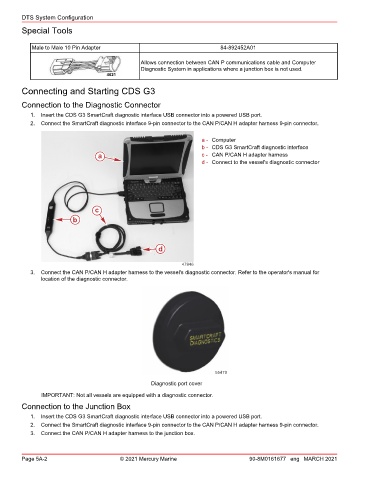
           2.  Connect the SmartCraft diagnostic interface 9‑pin connector to the CAN P/CAN H adapter harness 9‑pin connector.

                                                                    a - Computer
                                                                    b - CDS G3 SmartCraft diagnostic interface
                                 a                                  c - CAN P/CAN H adapter harness
                                                                    d - Connect to the vessel's diagnostic connector


                                c
                         b


                                                     d


                                                             47946
           3.  Connect the CAN P/CAN H adapter harness to the vessel's diagnostic connector. Refer to the operator's manual for
               location of the diagnostic connector.


                                                                        55479
                                                   Diagnostic port cover

               IMPORTANT: Not all vessels are equipped with a diagnostic connector.
        Connection to the Junction Box
           1.  Insert the CDS G3 SmartCraft diagnostic interface USB connector into a powered USB port.
           2.  Connect the SmartCraft diagnostic interface 9‑pin connector to the CAN P/CAN H adapter harness 9‑pin connector.
           3.  Connect the CAN P/CAN H adapter harness to the junction box.


        Page 5A-2                        © 2021 Mercury Marine                      90-8M0161677 eng MARCH 2021

