


Page 49 - Installation Manual - GenII DTS
P. 49
Legacy Controls
                   •   within harness length limits
                   •   that will position the trim switch with enough clearance between other components to install bezels, if equipped
               3.  If the dashboard is fiberglass, apply masking tape to the area that is to be drilled or cut to help prevent the dashboard from
                  cracking.
               4.  If the dashboard is vinyl covered, remove the vinyl from the area to be drilled or cut to keep the vinyl from tearing.
            Trim Switch Installation
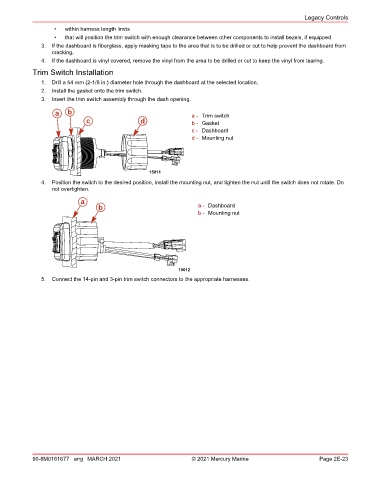
               1.  Drill a 54 mm (2‑1/8 in.) diameter hole through the dashboard at the selected location.
               2.  Install the gasket onto the trim switch.
               3.  Insert the trim switch assembly through the dash opening.
                   a   b                                        a - Trim switch
                              c                d                b - Gasket
                                                                c - Dashboard
                                                                d - Mounting nut


                                                  15011
               4.  Position the switch to the desired position, install the mounting nut, and tighten the nut until the switch does not rotate. Do
                  not overtighten.

                            a
                                  b                                a - Dashboard
                                                                   b - Mounting nut


                                                            15012
               5.  Connect the 14‑pin and 3‑pin trim switch connectors to the appropriate harnesses.


            90-8M0161677 eng MARCH 2021                         © 2021 Mercury Marine                      Page 2E-23

