


Page 44 - Installation Manual - GenII DTS
P. 44
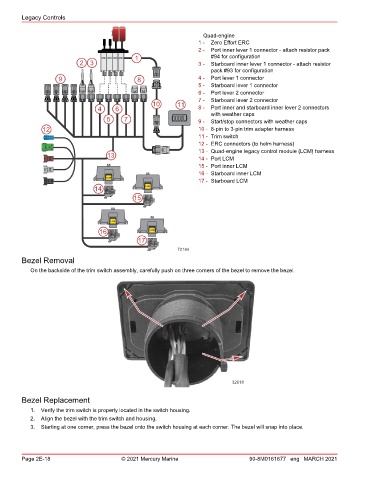
Legacy Controls

                                                                    Quad-engine
                                                                   1 -  Zero Effort ERC
                                                                   2 -  Port inner lever 1 connector ‑ attach resistor pack
                                              1                        #94 for configuration
                           2 3                                     3 -  Starboard inner lever 1 connector ‑ attach resistor
                                                                       pack #93 for configuration
                    9                         8                    4 -  Port lever 1 connector
                                                                   5 -  Starboard lever 1 connector
                                                                   6 -  Port lever 2 connector
                                                                   7 -  Starboard lever 2 connector
                                                   10       11
                                 4     6                           8 -  Port inner and starboard inner lever 2 connectors
                                                                       with weather caps
                                    5     7                        9 -  Start/stop connectors with weather caps
               12                                                  10 - 8‑pin to 3‑pin trim adapter harness
                                                                   11 - Trim switch
                                                                   12 - ERC connectors (to helm harness)
                                                                   13 - Quad‑engine legacy control module (LCM) harness
                                    13                             14 - Port LCM
                                                                   15 - Port inner LCM
                                                                   16 - Starboard inner LCM
                                    LCM
                                                                   17 - Starboard LCM
                                14               LCM
                                             15


                                      LCM
                                  16               LCM
                                               17
                                                            72184
        Bezel Removal

           On the backside of the trim switch assembly, carefully push on three corners of the bezel to remove the bezel.


                                                                              32618

        Bezel Replacement

           1.  Verify the trim switch is properly located in the switch housing.
           2.  Align the bezel with the trim switch and housing.
           3.  Starting at one corner, press the bezel onto the switch housing at each corner. The bezel will snap into place.


        Page 2E-18                       © 2021 Mercury Marine                      90-8M0161677 eng MARCH 2021

