


Page 19 - Computing Book 7
P. 19
Data Handling                                                                        Class 7


               Using Pivot Tables to Answer Questions:

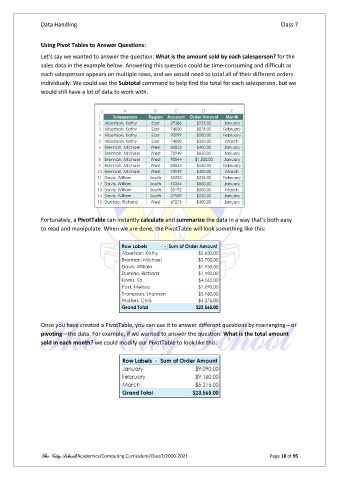
               Let's say we wanted to answer the question: What is the amount sold by each salesperson? for the
               sales data in the example below. Answering this question could be time-consuming and difficult as
               each salesperson appears on multiple rows, and we would need to total all of their different orders
               individually. We could use the Subtotal command to help find the total for each salesperson, but we
               would still have a lot of data to work with.


               Fortunately, a PivotTable can instantly calculate and summarize the data in a way that's both easy
               to read and manipulate. When we are done, the PivotTable will look something like this:


               Once you have created a PivotTable, you can use it to answer different questions by rearranging—or
               pivoting—the data. For example, if we wanted to answer the question: What is the total amount
               sold in each month? we could modify our PivotTable to look like this:


               The City School/Academics/Computing Curriculum/Class7/2020-2021                  Page 18 of 95

