


Page 17 - Computing Book 7
P. 17
Data Handling                                                                        Class 7


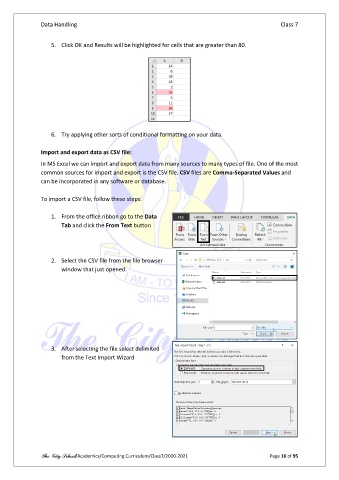
                   5.  Click OK and Results will be highlighted for cells that are greater than 80.


                   6.  Try applying other sorts of conditional formatting on your data.

               Import and export data as CSV file:
               In MS Excel we can import and export data from many sources to many types of file. One of the most
               common sources for import and export is the CSV file. CSV files are Comma-Separated Values and
               can be incorporated in any software or database.

               To import a CSV file, follow these steps:

                   1.  From the office ribbon go to the Data
                       Tab and click the From Text button


                   2.  Select the CSV file from the file browser
                       window that just opened.


                   3.  After selecting the file select delimited
                       from the Text Import Wizard


               The City School/Academics/Computing Curriculum/Class7/2020-2021                  Page 16 of 95

