


Page 14 - Computing book 6
P. 14
Analysing Data                                                                       Class 6


               Add a Legend to a Chart:

               Most charts use some kind of a legend to help readers understand the charted data. Whenever you
               create a chart in Excel, a legend for the chart is automatically generated at the same time. A chart
               can be missing a legend if it has been manually removed from the chart, but you can retrieve the
               missing legend.
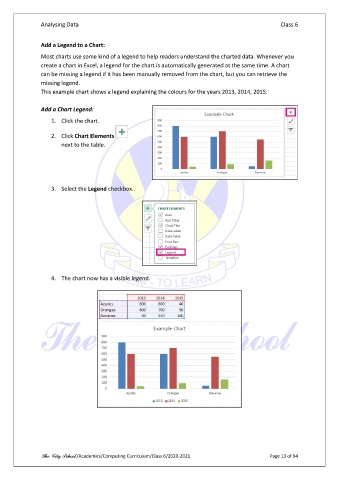
               This example chart shows a legend explaining the colours for the years 2013, 2014, 2015.

               Add a Chart Legend:

                   1.  Click the chart.

                   2.  Click Chart Elements
                       next to the table.


                   3.  Select the Legend checkbox.


                   4.  The chart now has a visible legend.


               The City School /Academics/Computing Curriculum/Class 6/2020-2021                Page 13 of 94

