


Page 31 - Computing book 6
P. 31
Document Creation                                                                    Class 6


               Tables:

               A table is a grid of cells arranged in rows and columns. Tables are useful for various tasks such as
               presenting text information and numerical data. In Word, you can create a blank table, convert text
               to a table, and apply a variety of styles and formats to existing tables.

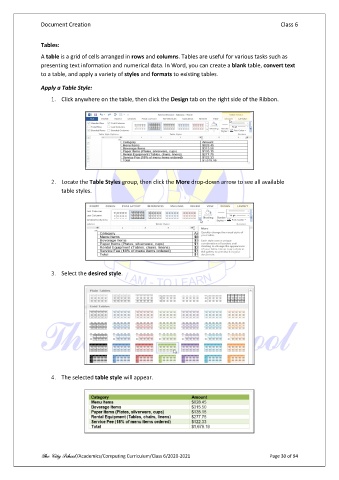
               Apply a Table Style:
                   1.  Click anywhere on the table, then click the Design tab on the right side of the Ribbon.


                   2.  Locate the Table Styles group, then click the More drop-down arrow to see all available
                       table styles.


                   3.  Select the desired style.


                   4.  The selected table style will appear.


               The City School /Academics/Computing Curriculum/Class 6/2020-2021                Page 30 of 94

