


Page 33 - Computing book 6
P. 33
Document Creation                                                                    Class 6


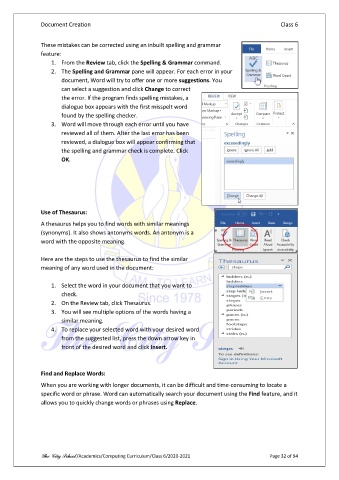
               These mistakes can be corrected using an inbuilt spelling and grammar
               feature:
                   1.  From the Review tab, click the Spelling & Grammar command.
                   2.  The Spelling and Grammar pane will appear. For each error in your
                       document, Word will try to offer one or more suggestions. You
                       can select a suggestion and click Change to correct
                       the error. If the program finds spelling mistakes, a
                       dialogue box appears with the first misspelt word
                       found by the spelling checker.
                   3.  Word will move through each error until you have
                       reviewed all of them. After the last error has been
                       reviewed, a dialogue box will appear confirming that
                       the spelling and grammar check is complete. Click
                       OK.


               Use of Thesaurus:
               A thesaurus helps you to find words with similar meanings
               (synonyms). It also shows antonyms words. An antonym is a
               word with the opposite meaning.

               Here are the steps to use the thesaurus to find the similar
               meaning of any word used in the document:

                   1.  Select the word in your document that you want to
                       check.
                   2.  On the Review tab, click Thesaurus.
                   3.  You will see multiple options of the words having a
                       similar meaning.
                   4.  To replace your selected word with your desired word
                       from the suggested list, press the down arrow key in
                       front of the desired word and click Insert.


               Find and Replace Words:

               When you are working with longer documents, it can be difficult and time-consuming to locate a
               specific word or phrase. Word can automatically search your document using the Find feature, and it
               allows you to quickly change words or phrases using Replace.


               The City School /Academics/Computing Curriculum/Class 6/2020-2021                Page 32 of 94

