


Page 66 - Computing book 6
P. 66
Modular Designing                                                                    Class 6


               Drawing page: The page in a drawing window that contains a drawing. A page can be either a
               foreground or a background page. Each page has a size, which usually corresponds to a standard
               paper size, and it has a scale.

               Paper Orientation

               Specifies the paper orientation as portrait or landscape.

               Setup

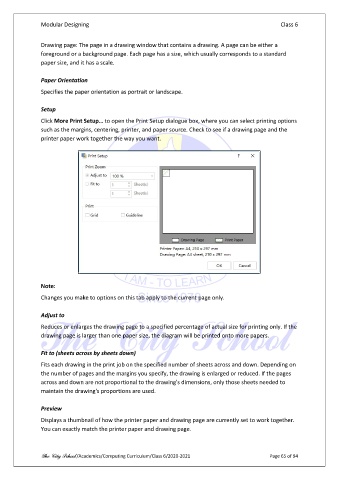
               Click More Print Setup… to open the Print Setup dialogue box, where you can select printing options
               such as the margins, centering, printer, and paper source. Check to see if a drawing page and the
               printer paper work together the way you want.


               Note:

               Changes you make to options on this tab apply to the current page only.

               Adjust to

               Reduces or enlarges the drawing page to a specified percentage of actual size for printing only. If the
               drawing page is larger than one paper size, the diagram will be printed onto more papers.

               Fit to (sheets across by sheets down)
               Fits each drawing in the print job on the specified number of sheets across and down. Depending on
               the number of pages and the margins you specify, the drawing is enlarged or reduced. If the pages
               across and down are not proportional to the drawing's dimensions, only those sheets needed to
               maintain the drawing's proportions are used.

               Preview

               Displays a thumbnail of how the printer paper and drawing page are currently set to work together.
               You can exactly match the printer paper and drawing page.


               The City School /Academics/Computing Curriculum/Class 6/2020-2021                Page 65 of 94

