


Page 71 - Computing book 6
P. 71
Handling Databases – MS Access                                                       Class 6


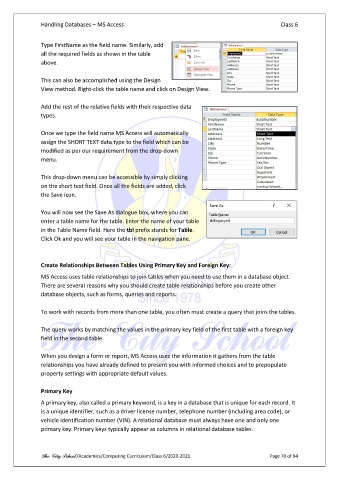
               Type FirstName as the field name. Similarly, add
               all the required fields as shown in the table
               above.

               This can also be accomplished using the Design
               View method. Right-click the table name and click on Design View.

               Add the rest of the relative fields with their respective data
               types.

               Once we type the field name MS Access will automatically
               assign the SHORT TEXT data type to the field which can be
               modified as per our requirement from the drop-down
               menu.

               This drop-down menu can be accessible by simply clicking
               on the short text field. Once all the fields are added, click
               the Save icon.

               You will now see the Save As dialogue box, where you can
               enter a table name for the table. Enter the name of your table
               in the Table Name field. Here the tbl prefix stands for Table.
               Click Ok and you will see your table in the navigation pane.


               Create Relationships Between Tables Using Primary Key and Foreign Key:
               MS Access uses table relationships to join tables when you need to use them in a database object.
               There are several reasons why you should create table relationships before you create other
               database objects, such as forms, queries and reports.

               To work with records from more than one table, you often must create a query that joins the tables.

               The query works by matching the values in the primary key field of the first table with a foreign key
               field in the second table.

               When you design a form or report, MS Access uses the information it gathers from the table
               relationships you have already defined to present you with informed choices and to prepopulate
               property settings with appropriate default values.

               Primary Key

               A primary key, also called a primary keyword, is a key in a database that is unique for each record. It
               is a unique identifier, such as a driver license number, telephone number (including area code), or
               vehicle identification number (VIN). A relational database must always have one and only one
               primary key. Primary keys typically appear as columns in relational database tables.


               The City School /Academics/Computing Curriculum/Class 6/2020-2021                Page 70 of 94

