


Page 64 - Computing book 6
P. 64
Modular Designing                                                                    Class 6


               Rulers and Grids:

               Rulers
               Each drawing window has vertical and horizontal rulers that show measurements at the scale of the
               drawing.
                   1.  The intervals of the ruler correspond to the measurement unit you set in the Page Setup
                       dialogue box.
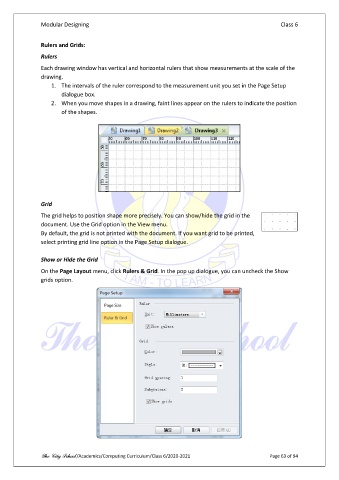
                   2.  When you move shapes in a drawing, faint lines appear on the rulers to indicate the position
                       of the shapes.


               Grid

               The grid helps to position shape more precisely. You can show/hide the grid in the
               document. Use the Grid option in the View menu.
               By default, the grid is not printed with the document. If you want grid to be printed,
               select printing grid line option in the Page Setup dialogue.

               Show or Hide the Grid

               On the Page Layout menu, click Rulers & Grid. In the pop up dialogue, you can uncheck the Show
               grids option.


               The City School /Academics/Computing Curriculum/Class 6/2020-2021                Page 63 of 94

