


Page 35 - Computing Book 5
P. 35
Presenting Your Ideas                                                                Class 5


               Slide Transitions:

               A transition can be as simple as fading to the next slide or as flashy as an eye-catching effect.
               PowerPoint makes it easy to apply transitions to some or all of your slides, giving your presentation
               an exciting and attractive look.

               Add Transitions between Slides:
               Here is the procedure to add transitions between slides:

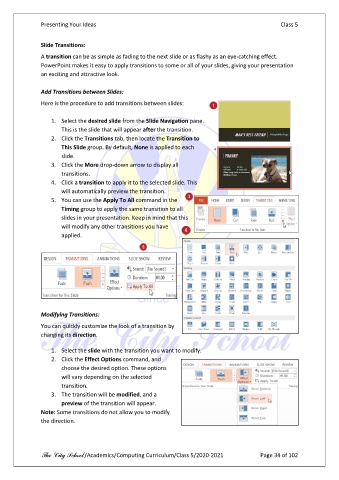
                   1.  Select the desired slide from the Slide Navigation pane.
                       This is the slide that will appear after the transition.
                   2.  Click the Transitions tab, then locate the Transition to
                       This Slide group. By default, None is applied to each
                       slide.
                   3.  Click the More drop-down arrow to display all
                       transitions.
                   4.  Click a transition to apply it to the selected slide. This
                       will automatically preview the transition.
                   5.  You can use the Apply To All command in the
                       Timing group to apply the same transition to all
                       slides in your presentation. Keep in mind that this
                       will modify any other transitions you have
                       applied.


               Modifying Transitions:

               You can quickly customize the look of a transition by
               changing its direction.

                   1.  Select the slide with the transition you want to modify.
                   2.  Click the Effect Options command, and
                       choose the desired option. These options
                       will vary depending on the selected
                       transition.
                   3.  The transition will be modified, and a
                       preview of the transition will appear.
               Note: Some transitions do not allow you to modify
               the direction.


               The City School /Academics/Computing Curriculum/Class 5/2020-2021            Page 34 of 102

