


Page 36 - Computing Book 5
P. 36
Presenting Your Ideas                                                                Class 5


               Modify the Transition Duration:

                   1.  Select the slide with the transition you want to modify.
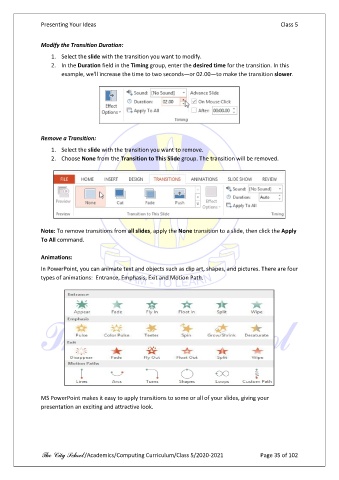
                   2.  In the Duration field in the Timing group, enter the desired time for the transition. In this
                       example, we'll increase the time to two seconds—or 02.00—to make the transition slower.


               Remove a Transition:
                   1.  Select the slide with the transition you want to remove.
                   2.  Choose None from the Transition to This Slide group. The transition will be removed.


               Note: To remove transitions from all slides, apply the None transition to a slide, then click the Apply
               To All command.

               Animations:
               In PowerPoint, you can animate text and objects such as clip art, shapes, and pictures. There are four
               types of animations:  Entrance, Emphasis, Exit and Motion Path.


               MS PowerPoint makes it easy to apply transitions to some or all of your slides, giving your
               presentation an exciting and attractive look.


               The City School /Academics/Computing Curriculum/Class 5/2020-2021            Page 35 of 102

