


Page 37 - Computing Book 5
P. 37
Presenting Your Ideas                                                                Class 5


               Apply an Animation on Object:

               Here is the procedure to apply an animation on an object:

                   1.  Select the object you want to animate.
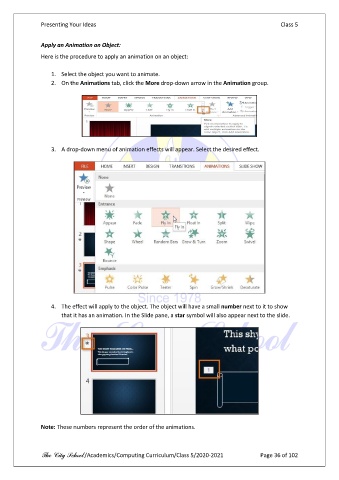
                   2.  On the Animations tab, click the More drop-down arrow in the Animation group.


                   3.  A drop-down menu of animation effects will appear. Select the desired effect.


                   4.  The effect will apply to the object. The object will have a small number next to it to show
                       that it has an animation. In the Slide pane, a star symbol will also appear next to the slide.


               Note: These numbers represent the order of the animations.


               The City School /Academics/Computing Curriculum/Class 5/2020-2021            Page 36 of 102

