


Page 44 - Computing Book 5
P. 44
Presenting Your Ideas                                                                Class 5


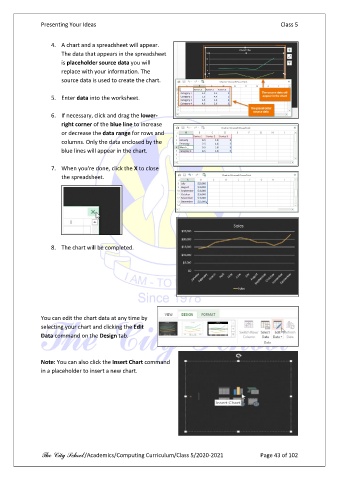
                   4.  A chart and a spreadsheet will appear.
                       The data that appears in the spreadsheet
                       is placeholder source data you will
                       replace with your information. The
                       source data is used to create the chart.

                   5.  Enter data into the worksheet.

                   6.  If necessary, click and drag the lower-
                       right corner of the blue line to increase
                       or decrease the data range for rows and
                       columns. Only the data enclosed by the
                       blue lines will appear in the chart.

                   7.  When you're done, click the X to close
                       the spreadsheet.


                   8.  The chart will be completed.


               You can edit the chart data at any time by
               selecting your chart and clicking the Edit
               Data command on the Design tab.


               Note: You can also click the Insert Chart command
               in a placeholder to insert a new chart.


               The City School /Academics/Computing Curriculum/Class 5/2020-2021            Page 43 of 102

