


Page 65 - Computing Book 5
P. 65
Desktop Publishing                                                                   Class 5


               Changing theme colours:

               Each shape element receives a different, but coordinated colour
               treatment. With the new Theme feature, you can format the colours
               and effects in an entire diagram with a single click.
               Edraw provides several predefined document theme colours, but you
               can also create your own by customizing an existing document theme
               colour, and then saving it as a custom document theme colour.

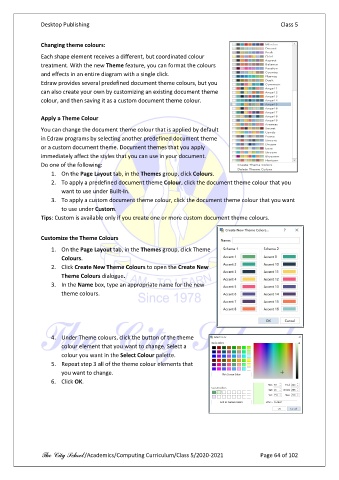
               Apply a Theme Colour

               You can change the document theme colour that is applied by default
               in Edraw programs by selecting another predefined document theme
               or a custom document theme. Document themes that you apply
               immediately affect the styles that you can use in your document.
               Do one of the following:
                   1.  On the Page Layout tab, in the Themes group, click Colours.
                   2.  To apply a predefined document theme Colour, click the document theme colour that you
                       want to use under Built-In.
                   3.  To apply a custom document theme colour, click the document theme colour that you want
                       to use under Custom.
               Tips: Custom is available only if you create one or more custom document theme colours.


               Customize the Theme Colours
                   1.  On the Page Layout tab, in the Themes group, click Theme
                       Colours.
                   2.  Click Create New Theme Colours to open the Create New
                       Theme Colours dialogue.
                   3.  In the Name box, type an appropriate name for the new
                       theme colours.


                   4.  Under Theme colours, click the button of the theme
                       colour element that you want to change. Select a
                       colour you want in the Select Colour palette.
                   5.  Repeat step 3 all of the theme colour elements that
                       you want to change.
                   6.  Click OK.


               The City School /Academics/Computing Curriculum/Class 5/2020-2021            Page 64 of 102

