


Page 21 - TCS ICT Book 5
P. 21
The City School  2021-2022


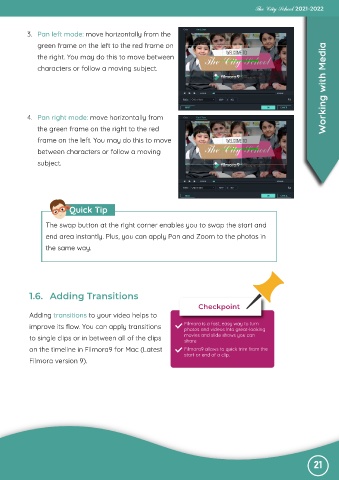
           3.  Pan left mode: move horizontally from the

              green frame on the left to the red frame on
                                                                                                                   Working with Media
              the right. You may do this to move between

              characters or follow a moving subject.


           4.  Pan right mode: move horizontally from
              the green frame on the right to the red

              frame on the left. You may do this to move
              between characters or follow a moving

              subject.


                         Quick Tip


                 The swap button at the right corner enables you to swap the start and

                 end area instantly. Plus, you can apply Pan and Zoom to the photos in
                 the same way.


           1.6.  Adding Transitions
                                                                       Checkpoint
           Adding transitions to your video helps to
           improve its flow. You can apply transitions            Filmora is a fast, easy way to turn
                                                                  photos and videos into great-looking
           to single clips or in between all of the clips         movies and slide shows you can
                                                                  share
           on the timeline in Filmora9 for Mac (Latest            Filmora9 allows to quick trim from the
                                                                  start or end of a clip.
           Filmora version 9).


                                                                                                               21

