


Page 49 - TCS ICT Book 5
P. 49
The City School  2021-2022


           2.5.  Working with Audio


           MS PowerPoint allows you to add audio to your presentation. For example,
           you could add background music to one slide, a sound effect to another, and

           even record your own narration or commentary. You can then edit the audio to
           customize it for your presentation.                                                                     Presenting Your Ideas


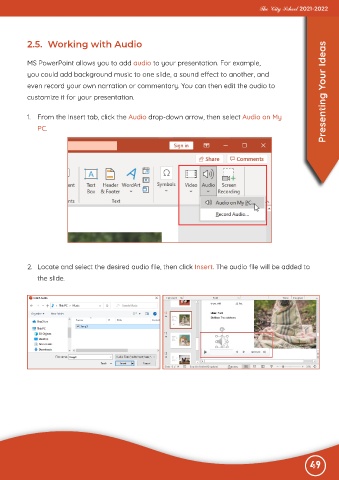
           1.  From the Insert tab, click the Audio drop-down arrow, then select Audio on My

              PC.


           2.  Locate and select the desired audio file, then click Insert. The audio file will be added to

              the slide.


                                                                                                              49
 2.5.  Working   with Audio

