


Page 51 - TCS ICT Book 5
P. 51
The City School  2021-2022


           Fade Audio Effect


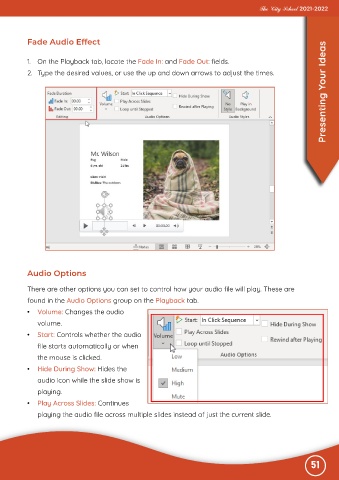
           1.  On the Playback tab, locate the Fade In: and Fade Out: fields.

           2.  Type the desired values, or use the up and down arrows to adjust the times.                         Presenting Your Ideas


           Audio Options

           There are other options you can set to control how your audio file will play. These are

           found in the Audio Options group on the Playback tab.
           •  Volume: Changes the audio

              volume.
           •  Start: Controls whether the audio

              file starts automatically or when
              the mouse is clicked.

           •  Hide During Show: Hides the
              audio icon while the slide show is

              playing.
           •  Play Across Slides: Continues

              playing the audio file across multiple slides instead of just the current slide.


                                                                                                              51

