


Page 79 - TCS ICT Book 5
P. 79
The City School  2021-2022


           3.8.  Customize a Document Theme


           To customize a document theme, you start by changing the colours, the fonts, or
           the line and fill effects that are used. Changes that you make to one or more of

           these theme components immediately affect the styles that you have applied in the
           active document. If you want to apply these changes to new documents, you can                            Desktop Publishing

           save them as a custom document theme.


           Customize Theme Colours


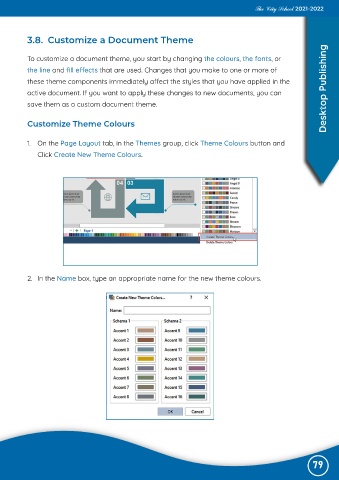
           1.  On the Page Layout tab, in the Themes group, click Theme Colours button and

              Click Create New Theme Colours.


           2.  In the Name box, type an appropriate name for the new theme colours.


                                                                                                               79

