


Page 64 - TCS ICT Book 4
P. 64
The City School  2021-2022


           SUM


           The SUM function can be used to find the total of numbers entered in a range of cells. The

           SUM function follows the following syntax:


                                         =SUM (number1, [number2],

                                         [number3], ...)


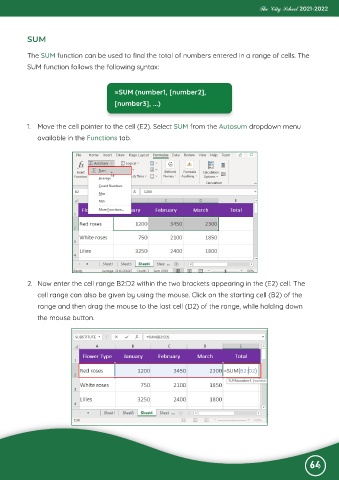
           1.  Move the cell pointer to the cell (E2). Select SUM from the Autosum dropdown menu

              available in the Functions tab.


           2.  Now enter the cell range B2:D2 within the two brackets appearing in the (E2) cell. The

              cell range can also be given by using the mouse. Click on the starting cell (B2) of the
              range and then drag the mouse to the last cell (D2) of the range, while holding down
              the mouse button.


                                                                                                              64

