


Page 60 - TCS ICT Book 4
P. 60
The City School  2021-2022


           3.7.  Wrapping Text and Merging Cells


           Whenever you have too much cell content to be                         Checkpoint
           displayed in a single cell, you may decide to wrap the

           text or merge the cell rather than resize a column.              Excel is a spreadsheet program that
                                                                            allows you to store, organize, and
           Wrapping the text will automatically modify a cell’s             analyze information.

           row height, allowing cell contents to be displayed on            The AutoFit feature will allow you to
                                                                            set a column’s width to fit its content
           multiple lines. Merging allows you to combine a cell             automatically.

           with adjacent empty cells to create one large cell.


           Text Wrapping in a Cell


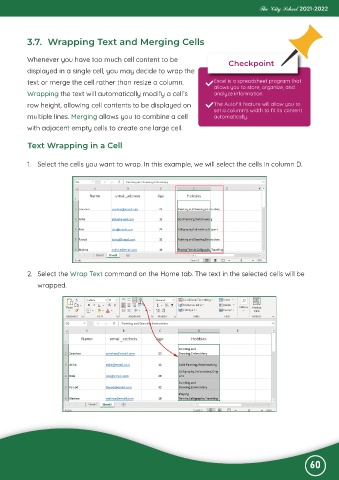
           1.  Select the cells you want to wrap. In this example, we will select the cells in column D.


           2.  Select the Wrap Text command on the Home tab. The text in the selected cells will be
              wrapped.


                                                                                                              60

