


Page 130 - Learn To Program With Scratch
P. 130
n o t e    A variable’s monitor also indicates its scope. If a variable belongs to one sprite, its
                         monitor should show the sprite name before the variable name. For example, the moni-
                         tor Cat speed 0 indicates that speed belongs to Cat. If the speed variable were a
                         global variable, its monitor would only say speed 0. The difference between the two
                         cases is illustrated in the following figure.
                                                          This monitor indicates that the speed
                                                          variable belongs to the Cat sprite.

                                                          This monitor indicates that speed is
                                                          a global variable.


              using Variable monitors in applications

                         Now that you know the basics behind variable monitors, I’ll show you some
                         ways you could use them to add some extra functionality to your Scratch
                         applications.
                             The ability to use monitors as both displays and controls opens the
                         door for a wide range of applications, including games, simulations, and
                         interactive programs. Let’s explore some examples that make use of moni-
                         tors in the following subsections.


                         Simulating Ohm’s Law
            OhmsLaw .sb2  Our first example is a simulation of Ohm’s law. When a voltage (V) is
                         applied across a resistor (R), a current (I) will flow through that resistor.
                         According to Ohm’s law, the amount of current is given by this equation:

                                                         VoltageV ()
                                             CurrentI () =
                                                        Resistance R ()

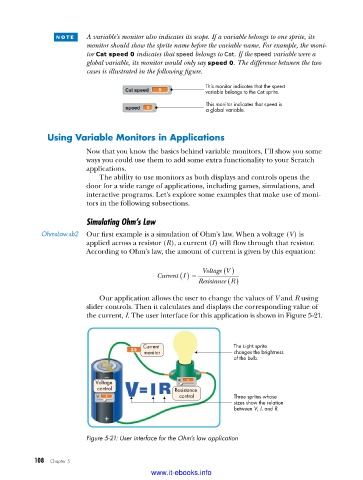
                             Our application allows the user to change the values of V and R using
                         slider controls. Then it calculates and displays the corresponding value of
                         the current, I. The user interface for this application is shown in Figure 5-21.


                                         Current                  The Light sprite
                                         monitor                  changes the brightness
                                                                  of the bulb.


                            Voltage
                            control               Resistance
                                                   control        Three sprites whose
                                                                  sizes show the relation
                                                                  between V, I, and R.


                         Figure 5-21: User interface for the Ohm’s law application


           108   Chapter 5
                                           www.it-ebooks.info

