


Page 131 - Learn To Program With Scratch
P. 131
The slider for the battery voltage (V) has a range of [0, 10], and the
                          slider for the resistor (R) has a range of [1, 10]. When the user changes V
                          or R with the sliders, the application calculates the corresponding value of
                          the current (I) that flows in the circuit. The brightness of the bulb changes
                          in proportion to the value of the current passing through it: The higher the
                          current, the brighter the light bulb. The sizes of the V, I, and R letters in the
                          figure also change to indicate the relative values of these quantities.
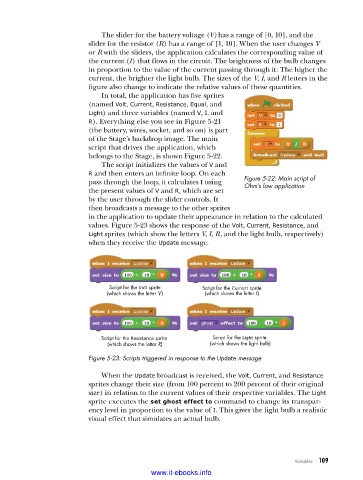
                             In total, the application has five sprites
                          (named Volt, Current, Resistance, Equal, and
                          Light) and three variables (named V, I, and
                          R). Everything else you see in Figure 5-21
                          (the battery, wires, socket, and so on) is part
                          of the Stage’s backdrop image. The main
                          script that drives the application, which
                          belongs to the Stage, is shown Figure 5-22.
                             The script initializes the values of V and
                          R and then enters an infinite loop. On each
                          pass through the loop, it calculates I using   Figure 5-22: Main script of
                                                                     Ohm’s law application
                          the present values of V and R, which are set
                          by the user through the slider controls. It
                          then broadcasts a message to the other sprites
                          in the application to update their appearance in relation to the calculated
                          values. Fig ure 5-23 shows the response of the Volt, Current, Resistance, and
                          Light sprites (which show the letters V, I, R, and the light bulb, respectively)
                          when they receive the Update message.


                               Script for the Volt sprite  Script for the Current sprite

                               (which shows the letter V)  (which shows the letter I)


                             Script for the Resistance sprite   Script for the Light sprite
                               (which shows the letter R)  (which shows the light bulb)
                          Figure 5-23: Scripts triggered in response to the Update message

                             When the Update broadcast is received, the Volt, Current, and Resistance
                          sprites change their size (from 100 percent to 200 percent of their original
                          size) in relation to the current values of their respective variables. The Light
                          sprite executes the set ghost effect to command to change its transpar-
                          ency level in proportion to the value of I. This gives the light bulb a realistic
                          visual effect that simulates an actual bulb.


                                                                                   Variables   109

                                           www.it-ebooks.info

