


Page 127 - Learn To Program With Scratch
P. 127
Stage’s backpack
                Sprite’s backpack
                                            costume #, costume   STAGE
               x-position, y-position,      name, volume #,
               direction, costume #,        graphic effects, etc.
               costume name, size,
               volume, graphic
               effects, etc.                                            Variables with scope
                                                                            For all sprites
               All variables with
               scope For this
               sprite only             clone
                                 clone


                Clone1 backpack                   Clone2 backpack
               x-position, y-position,           x-position, y-position,
               direction, costume #,             direction, costume #,
               costume name, size,               costume name, size,
               volume, graphic                   volume, graphic
               effects, etc.                     effects, etc.
               All variables with                All variables with
               scope For this                    scope For this
               sprite only                       sprite only

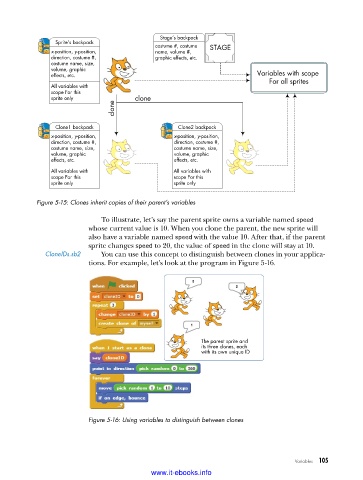
           Figure 5-15: Clones inherit copies of their parent’s variables

                             To illustrate, let’s say the parent sprite owns a variable named speed
                          whose current value is 10. When you clone the parent, the new sprite will
                          also have a variable named speed with the value 10. After that, if the parent
                          sprite changes speed to 20, the value of speed in the clone will stay at 10.
              CloneIDs .sb2  You can use this concept to distinguish between clones in your applica-
                          tions. For example, let’s look at the program in Figure 5-16.


                                                         The parent sprite and
                                                         its three clones, each
                                                         with its own unique ID


                          Figure 5-16: Using variables to distinguish between clones


                                                                                   Variables   105

                                           www.it-ebooks.info

