


Page 55 - Learn To Program With Scratch
P. 55
the Power of repeat
                          Our programs have been relatively simple so far, but as you start writing
                          longer scripts, you’ll often need to replicate the same stack of blocks several
                          times in a row. Duplicating scripts can make your program longer, harder
                          to understand, and tougher to experiment with. If you need to change one
                          number, for example, you’ll have to make the same change in each copy of
                          the block. The repeat command from the Control palette can help you avoid
                          this problem.
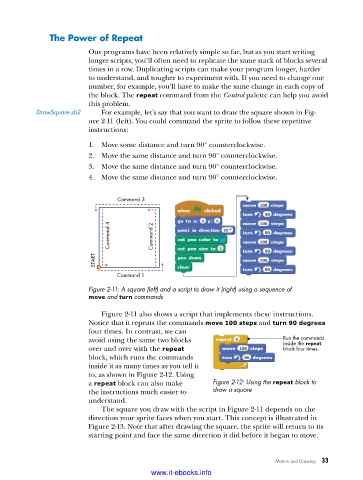
           DrawSquare .sb2   For example, let’s say that you want to draw the square shown in Fig-
                          ure 2-11 (left). You could command the sprite to follow these repetitive
                          instructions:
                          1.  Move some distance and turn 90° counterclockwise.
                          2.  Move the same distance and turn 90° counterclockwise.
                          3.  Move the same distance and turn 90° counterclockwise.
                          4.  Move the same distance and turn 90° counterclockwise.


                                  Command 3


                               Command 4   Command 2


                           START

                                  Command 1
                          Figure 2-11: A square (left) and a script to draw it (right) using a sequence of
                          move and turn commands

                             Figure 2-11 also shows a script that implements these instructions.
                          Notice that it repeats the commands move 100 steps and turn 90 degrees
                          four times. In contrast, we can
                          avoid using the same two blocks                       Run the commands
                                                                                inside the repeat
                          over and over with the repeat                         block four times.
                          block, which runs the commands
                          inside it as many times as you tell it
                          to, as shown in Figure 2-12. Using
                          a repeat block can also make      Figure 2-12: Using the repeat block to
                          the instructions much easier to   draw a square
                          understand.
                             The square you draw with the script in Figure 2-11 depends on the
                          direction your sprite faces when you start. This concept is illustrated in
                          Figure 2-13. Note that after drawing the square, the sprite will return to its
                          starting point and face the same direction it did before it began to move.


                                                                              Motion and Drawing   33

                                           www.it-ebooks.info

