


Page 54 - Learn To Program With Scratch
P. 54
Move the sprite forward 10 steps
Move the sprite backward 10 steps.
Turn the sprite to the right 10˚.
Turn the sprite to the left 10˚.
Figure 2-9: The Easy Draw application in action
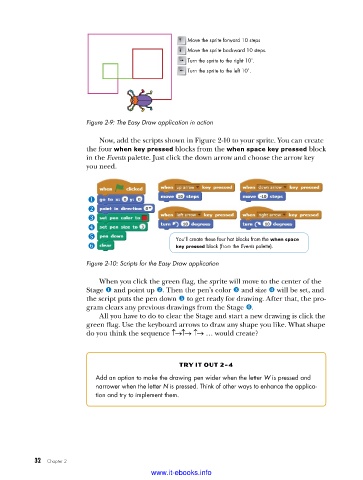
Now, add the scripts shown in Figure 2-10 to your sprite. You can create
the four when key pressed blocks from the when space key pressed block
in the Events palette. Just click the down arrow and choose the arrow key
you need.
You’ll create these four hat blocks from the when space
key pressed block (from the Events palette).
Figure 2-10: Scripts for the Easy Draw application
When you click the green flag, the sprite will move to the center of the
Stage u and point up v. Then the pen’s color w and size x will be set, and
the script puts the pen down y to get ready for drawing. After that, the pro-
gram clears any previous drawings from the Stage z.
All you have to do to clear the Stage and start a new drawing is click the
green flag. Use the keyboard arrows to draw any shape you like. What shape
do you think the sequence ↑→↑→ ↑→ … would create?
try it out 2-4
Add an option to make the drawing pen wider when the letter W is pressed and
narrower when the letter N is pressed . Think of other ways to enhance the applica-
tion and try to implement them .
32 Chapter 2
www.it-ebooks.info

