


Page 57 - Learn To Program With Scratch
P. 57
try it out 2-6
                            Notice that (12 repeats) × (30° for each repeat) = 360° . What do you think would
                            happen if you changed the numbers in the program to 4 repeats and 90°? What
                            about 5 and 72°? Experiment with different values for the repeat count and the
                            turn angle to see what happens .


                          Exploring with Stamp
              Windmill .sb2  In the previous section, you learned to use the turn and repeat blocks to
                          transform simple shapes into complex patterns. But what if you want to rotate
                          more challenging shapes? Instead of drawing the basic shape with move and
                          turn commands, you can make a new costume in the Paint Editor and use the
                          stamp block to draw multiple copies of it on the Stage. To illustrate this tech-
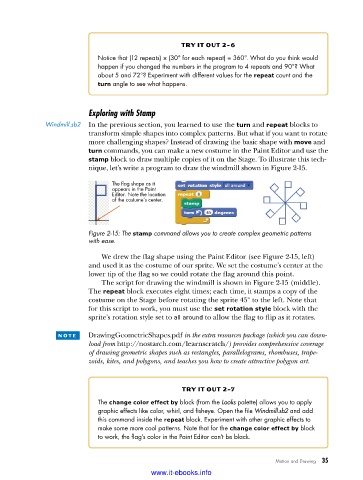
                          nique, let’s write a program to draw the windmill shown in Figure 2-15.

                                The flag shape as it
                                appears in the Paint
                                Editor. Note the location
                                of the costume’s center.


                          Figure 2-15: The stamp command allows you to create complex geometric patterns
                          with ease .

                             We drew the flag shape using the Paint Editor (see Figure 2-15, left)
                          and used it as the costume of our sprite. We set the costume’s center at the
                          lower tip of the flag so we could rotate the flag around this point.
                             The script for drawing the windmill is shown in Figure 2-15 (middle).
                          The repeat block executes eight times; each time, it stamps a copy of the
                          costume on the Stage before rotating the sprite 45° to the left. Note that
                          for this script to work, you must use the set rotation style block with the
                          sprite’s rotation style set to all around to allow the flag to flip as it rotates.

                 n o t e    DrawingGeometricShapes.pdf in the extra resources package (which you can down-
                          load from http://nostarch.com/learnscratch/) provides comprehensive coverage
                          of drawing geometric shapes such as rectangles, parallelograms, rhombuses, trape-
                          zoids, kites, and polygons, and teaches you how to create attractive polygon art.


                                                    try it out 2-7
                            The change color effect by block (from the Looks palette) allows you to apply
                            graphic effects like color, whirl, and fisheye . Open the file Windmill.sb2 and add
                            this command inside the repeat block . Experiment with other graphic effects to
                            make some more cool patterns . Note that for the change color effect by block
                            to work, the flag’s color in the Paint Editor can’t be black .


                                                                              Motion and Drawing   35

                                           www.it-ebooks.info

