


Page 56 - Learn To Program With Scratch
P. 56
Initial position
Initial direction
Figure 2-13: The sprite’s initial direction changes the square’s location .
try it out 2-5
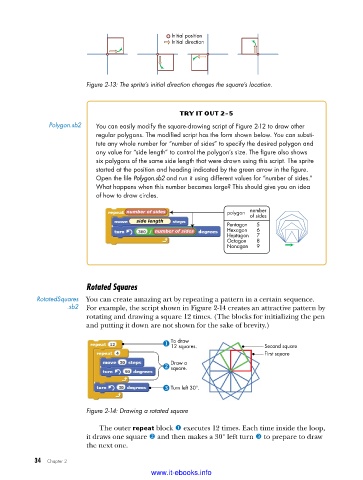
Polygon .sb2 You can easily modify the square-drawing script of Figure 2-12 to draw other
regular polygons . The modified script has the form shown below . You can substi-
tute any whole number for “number of sides” to specify the desired polygon and
any value for “side length” to control the polygon’s size . The figure also shows
six polygons of the same side length that were drawn using this script . The sprite
started at the position and heading indicated by the green arrow in the figure .
Open the file Polygon.sb2 and run it using different values for “number of sides .”
What happens when this number becomes large? This should give you an idea
of how to draw circles .
number of sides polygon number
of sides
side length
Pentagon 5
number of sides Hexagon 6
Heptagon 7
Octagon 8
Nonagon 9
Rotated Squares
RotatedSquares You can create amazing art by repeating a pattern in a certain sequence.
.sb2 For example, the script shown in Figure 2-14 creates an attractive pattern by
rotating and drawing a square 12 times. (The blocks for initializing the pen
and putting it down are not shown for the sake of brevity.)
To draw Second square
12 squares.
First square
Draw a
square.
Turn left 30°.
Figure 2-14: Drawing a rotated square
The outer repeat block u executes 12 times. Each time inside the loop,
it draws one square v and then makes a 30° left turn w to prepare to draw
the next one.
34 Chapter 2
www.it-ebooks.info

