


Page 84 - AutoCAD Dalam KEJURUTERAAN ELEKTRIK Dan ELEKTRONIK
P. 84
Contoh

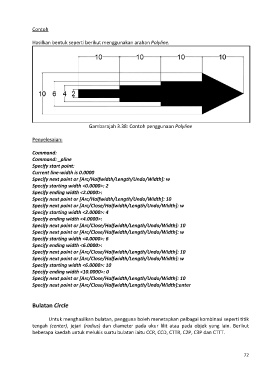
               Hasilkan bentuk seperti berikut menggunakan arahan Polyline.


                                         Gambarajah 3.38: Contoh penggunaan Polyline

               Penyelesaian:

               Command:
               Command: _pline
               Specify start point:
               Current line-width is 0.0000
               Specify next point or [Arc/Halfwidth/Length/Undo/Width]: w
               Specify starting width <0.0000>: 2
               Specify ending width <2.0000>:
               Specify next point or [Arc/Halfwidth/Length/Undo/Width]: 10
               Specify next point or [Arc/Close/Halfwidth/Length/Undo/Width]: w
               Specify starting width <2.0000>: 4
               Specify ending width <4.0000>:
               Specify next point or [Arc/Close/Halfwidth/Length/Undo/Width]: 10
               Specify next point or [Arc/Close/Halfwidth/Length/Undo/Width]: w
               Specify starting width <4.0000>: 6
               Specify ending width <6.0000>:
               Specify next point or [Arc/Close/Halfwidth/Length/Undo/Width]: 10
               Specify next point or [Arc/Close/Halfwidth/Length/Undo/Width]: w
               Specify starting width <6.0000>: 10
               Specify ending width <10.0000>: 0
               Specify next point or [Arc/Close/Halfwidth/Length/Undo/Width]: 10
               Specify next point or [Arc/Close/Halfwidth/Length/Undo/Width]:enter


               Bulatan Circle


                       Untuk menghasilkan bulatan, pengguna boleh menetapkan pelbagai kombinasi seperti titik
               tengah  (center), jejari  (radius)  dan diameter  pada  ukur lilit atau  pada  objek yang lain. Berikut
               beberapa kaedah untuk melukis suatu bulatan iaitu CCR, CCD, CTTR, C2P, C3P dan CTTT.


                                                                                                             72

