


Page 146 - Basic Course
P. 146
KNX BASIC COURSE

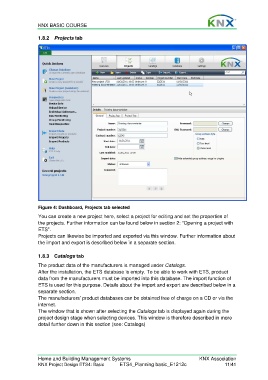
                  1.8.2  Projects tab


                  Figure 4: Dashboard, Projects tab selected
                  You can create a new project here, select a project for editing and set the properties of
                  the projects. Further information can be found below in section 2: “Opening a project with
                  ETS”.
                  Projects can likewise be imported and exported via this window. Further information about
                  the import and export is described below in a separate section.


                  1.8.3 Catalogs tab

                  The product data of the manufacturers is managed under Catalogs.
                  After the installation, the ETS database is empty. To be able to work with ETS, product
                  data from the manufacturers must be imported into this database. The import function of
                  ETS is used for this purpose. Details about the import and export are described below in a
                  separate section.
                  The manufacturers’ product databases can be obtained free of charge on a CD or via the
                  internet.
                  The window that is shown after selecting the Catalogs tab is displayed again during the
                  project design stage when selecting devices. This window is therefore described in more
                  detail further down in this section (see: Catalogs)


                  Home and Building Management Systems                                    KNX Association
                  KNX Project Design ETS4: Basic      ETS4_Planning basic_E1212c                     11/41

