


Page 159 - Basic Course
P. 159
KNX BASIC COURSE

                  To a large extend, the project design of a KNX installation is done in the panels. They can
                  be used simultaneously. Panels can be arranged according to the editing process. The
                  following panels are available:

                     Buildings,
                      Group Addresses,
                     Topology,
                     Project Root,
                     Devices,
                     Catalogs
                      and as a special case
                     Side Bar


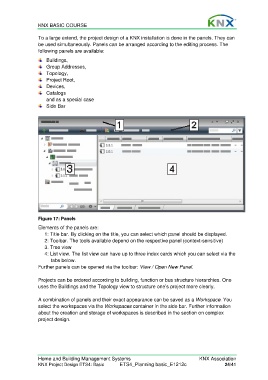
                  Figure 17: Panels
                  Elements of the panels are:
                     1: Title bar. By clicking on the title, you can select which panel should be displayed.
                     2: Toolbar. The tools available depend on the respective panel (context-sensitive)
                     3. Tree view
                     4: List view. The list view can have up to three index cards which you can select via the
                        tabs below.
                  Further panels can be opened via the toolbar: View / Open New Panel.

                  Projects can be ordered according to building, function or bus structure hierarchies. One
                  uses the Buildings and the Topology view to structure one’s project more clearly.

                  A combination of panels and their exact appearance can be saved as a Workspace. You
                  select the workspaces via the Workspaces container in the side bar. Further information
                  about the creation and storage of workspaces is described in the section on complex
                  project design.


                  Home and Building Management Systems                                    KNX Association
                  KNX Project Design ETS4: Basic      ETS4_Planning basic_E1212c                     24/41

