


Page 163 - Basic Course
P. 163
KNX BASIC COURSE


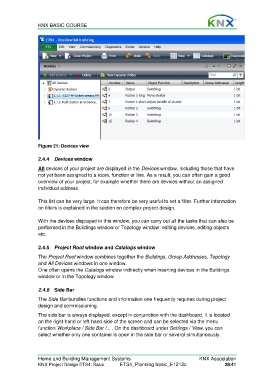
                  Figure 21: Devices view

                  2.4.4  Devices window

                  All devices of your project are displayed in the Devices window, including those that have
                  not yet been assigned to a room, function or line. As a result, you can often gain a good
                  overview of your project, for example whether there are devices without an assigned
                  individual address.

                  This list can be very large. It can therefore be very useful to set a filter. Further information
                  on filters is explained in the section on complex project design.

                  With the devices displayed in this window, you can carry out all the tasks that can also be
                  performed in the Buildings window or Topology window: editing devices, editing objects
                  etc.


                  2.4.5  Project Root window and Catalogs window
                  The Project Root window combines together the Buildings, Group Addresses, Topology
                  and All Devices windows in one window.
                  One often opens the Catalogs window indirectly when inserting devices in the Buildings
                  window or in the Topology window.


                  2.4.6  Side Bar
                  The Side Bar bundles functions and information one frequently requires during project
                  design and commissioning.
                  The side bar is always displayed, except in conjunction with the dashboard. It is located
                  on the right-hand or left-hand side of the screen and can be selected via the menu
                  function Workplace / Side Bar /... . On the dashboard under Settings / View, you can
                  select whether only one container is open in the side bar or several simultaneously.


                  Home and Building Management Systems                                    KNX Association
                  KNX Project Design ETS4: Basic      ETS4_Planning basic_E1212c                     28/41

