


Page 162 - Basic Course
P. 162
KNX BASIC COURSE


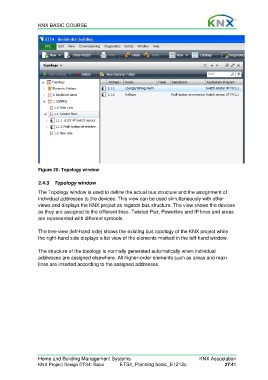
                  Figure 20: Topology window


                  2.4.3  Topology window
                  The Topology window is used to define the actual bus structure and the assignment of
                  individual addresses to the devices. This view can be used simultaneously with other
                  views and displays the KNX project as regards bus structure. The view shows the devices
                  as they are assigned to the different lines. Twisted Pair, Powerline and IP lines and areas
                  are represented with different symbols.

                  The tree view (left-hand side) shows the existing bus topology of the KNX project while
                  the right-hand side displays a list view of the elements marked in the left-hand window.

                  The structure of the topology is normally generated automatically when individual
                  addresses are assigned elsewhere. All higher-order elements such as areas and main
                  lines are inserted according to the assigned addresses.


                  Home and Building Management Systems                                    KNX Association
                  KNX Project Design ETS4: Basic      ETS4_Planning basic_E1212c                     27/41

