


Page 270 - Basic Course
P. 270
KNX BASIC COURSE

                  4.1  Starting and stopping a telegram recording


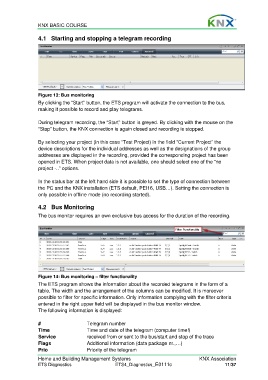
                  Figure 13: Bus monitoring
                  By clicking the “Start” button, the ETS program will activate the connection to the bus,
                  making it possible to record and play telegrams.

                  During telegram recording, the “Start” button is greyed. By clicking with the mouse on the
                  “Stop” button, the KNX connection is again closed and recording is stopped.

                  By selecting your project (in this case “Test Project) in the field “Current Project” the
                  device descriptions for the individual addresses as well as the designations of the group
                  addresses are displayed in the recording, provided the corresponding project has been
                  opened in ETS. When project data is not available, one should select one of the “no
                  project -..” options.

                  In the status bar at the left hand side it is possible to set the type of connection between
                  the PC and the KNX installation (ETS default, PEI16, USB…). Setting the connection is
                  only possible in offline mode (no recording started).

                  4.2 Bus Monitoring

                  The bus monitor requires an own exclusive bus access for the duration of the recording.


                  Figure 14: Bus monitoring – filter functionality
                  The ETS program shows the information about the recorded telegrams in the form of a
                  table. The width and the arrangement of the columns can be modified. It is moreover
                  possible to filter for specific information. Only information complying with the filter criteria
                  entered in the right upper field will be displayed in the bus monitor window.
                  The following information is displayed:

                  #                     Telegram number
                  Time                  Time and date of the telegram (computer time!)
                  Service               received from or sent to the bus/start and stop of the trace
                  Flags                 Additional information (data package nr.,…)
                  Prio                  Priority of the telegram

                  Home and Building Management Systems                                    KNX Association
                  ETS Diagnostics                   ETS4_Diagnostics_E0111c                          11/37

