


Page 273 - Basic Course
P. 273
KNX BASIC COURSE


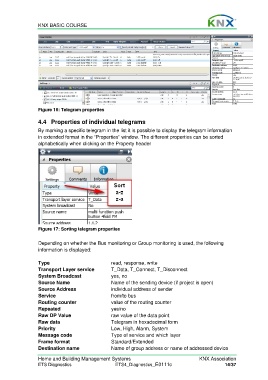
                  Figure 16: Telegram properties

                  4.4  Properties of individual telegrams
                  By marking a specific telegram in the list it is possible to display the telegram information
                  in extended format in the “Properties” window. The different properties can be sorted
                  alphabetically when clicking on the Property header


                  Figure 17: Sorting telegram properties

                  Depending on whether the Bus monitoring or Group monitoring is used, the following
                  information is displayed:

                  Type                            read, response, write
                  Transport Layer service         T_Data, T_Connect, T_Disconnect
                  System Broadcast                yes, no
                  Source Name                     Name of the sending device (if project is open)
                  Source Address                  individual address of sender
                  Service                         from/to bus
                  Routing counter                 value of the routing counter
                  Repeated                        yes/no
                  Raw DP Value                    raw value of the data point
                  Raw data                        Telegram in hexadecimal form
                  Priority                        Low, High, Alarm, System
                  Message code                    Type of service and which layer
                  Frame format                    Standard/Extended
                  Destination name                Name of group address or name of addressed device

                  Home and Building Management Systems                                    KNX Association
                  ETS Diagnostics                   ETS4_Diagnostics_E0111c                          14/37

