


Page 282 - Basic Course
P. 282
KNX BASIC COURSE


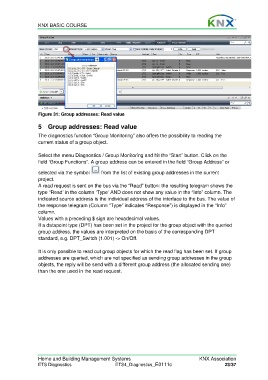
                  Figure 31: Group addresses: Read value

                  5  Group addresses: Read value

                  The diagnostics function “Group Monitoring” also offers the possibility to reading the
                  current status of a group object.

                  Select the menu Diagnostics / Group Monitoring and hit the “Start” button. Click on the
                  field ‘Group Functions”. A group address can be entered in the field “Group Address” or

                  selected via the symbol     from the list of existing group addresses in the current
                  project.
                  A read request is sent on the bus via the “Read” button: the resulting telegram shows the
                  type “Read’ in the column ‘Type’ AND does not show any value in the “Info” column. The
                  indicated source address is the individual address of the interface to the bus. The value of
                  the response telegram (Column “Type” indicates “Response”) is displayed in the “Info”
                  column.
                  Values with a preceding $ sign are hexadecimal values.
                  If a datapoint type (DPT) has been set in the project for the group object with the queried
                  group address, the values are interpreted on the basis of the corresponding DPT
                  standard, e.g. DPT_Switch (1.001) -> On/Off.

                  It is only possible to read out group objects for which the read flag has been set. If group
                  addresses are queried, which are not specified as sending group addresses in the group
                  objects, the reply will be send with a different group address (the allocated sending one)
                  than the one used in the read request.


                  Home and Building Management Systems                                    KNX Association
                  ETS Diagnostics                   ETS4_Diagnostics_E0111c                          23/37

