


Page 277 - Basic Course
P. 277
KNX BASIC COURSE

                  every month or every year. When selecting the “number of telegrams” option, it is possible
                  to enter a value in the field underneath.
                  The name of the log files can be made unique by appending either “Date and time”, “Date
                  and consecutive number”, “Date only” or just “Consecutive number”. By setting the option
                  “Automatically delete old log files” one can determine whether or not old log files should
                  be deleted. If the option “Based on number of files” is selected the field “Maximum number
                  of log files” is enabled.
                  Example: Enter “3” in the field “Maximum number of log files” and start a telegram
                  recording session 4 times. The ETS will first create the following files:
                  1) Telegrams 2010-11-16_142814.xml (whereby 14 = hour, 28 = minutes, 14 = seconds)
                  2) Telegrams 2010-11-16_143012.xml
                  3) Telegrams 2010-11-16_143142.xml

                                                              st
                  Upon starting the 4th recording session, the 1  and oldest telegram recording (i.e.
                  142814.xml) will be deleted and a new log file will be created, i.e. Telegrams 2010-11-
                  16_143214.xml.

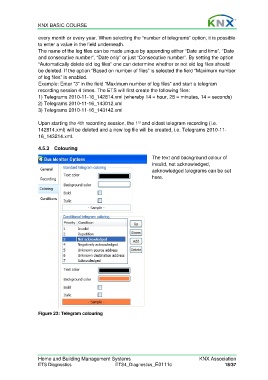
                  4.5.3 Colouring

                                                                     The text and background colour of
                                                                     invalid, not acknowledged,
                                                                     acknowledged telegrams can be set
                                                                     here.


                  Figure 23: Telegram colouring


                  Home and Building Management Systems                                    KNX Association
                  ETS Diagnostics                   ETS4_Diagnostics_E0111c                          18/37

