


Page 89 - Client Coordinator
P. 89
5.  Once the reminder list is exported into excel. Highlight the column with the
                                         telephone numbers.
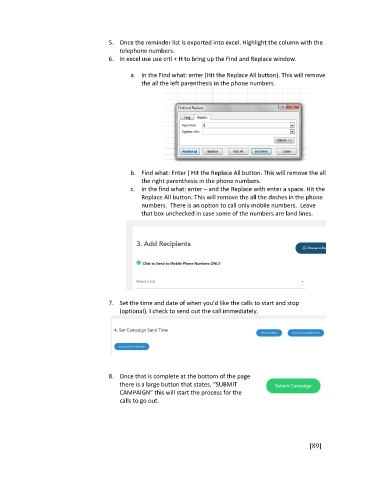
                                     6.  In excel use use crtl + H to bring up the Find and Replace window.

                                            a.  In the Find what: enter (Hit the Replace All button). This will remove
                                                the all the left parenthesis in the phone numbers.


                                            b.  Find what: Enter ) Hit the Replace All button. This will remove the all
                                                the right parenthesis in the phone numbers.
                                            c.  In the find what: enter – and the Replace with enter a space. Hit the
                                                Replace All button. This will remove the all the dashes in the phone
                                                numbers.  There is an option to call only mobile numbers.  Leave
                                                that box unchecked in case some of the numbers are land lines.


                                     7.  Set the time and date of when you’d like the calls to start and stop
                                         (optional). I check to send out the call immediately.


                                     8.  Once that is complete at the bottom of the page
                                         there is a large button that states, “SUBMIT
                                         CAMPAIGN” this will start the process for the
                                         calls to go out.


                                                                                                       [89]

