


Page 90 - Client Coordinator
P. 90
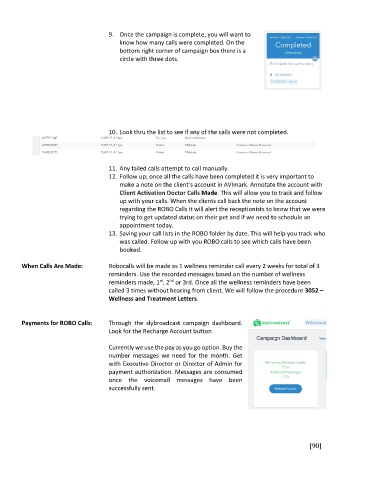
9.  Once the campaign is complete, you will want to
                                         know how many calls were completed. On the
                                         bottom right corner of campaign box there is a
                                         circle with three dots.


                                     10. Look thru the list to see if any of the calls were not completed.


                                     11. Any failed calls attempt to call manually.
                                     12. Follow up; once all the calls have been completed it is very important to
                                         make a note on the client’s account in AVImark. Annotate the account with
                                         Client Activation Doctor Calls Made. This will allow you to track and follow
                                         up with your calls. When the clients call back the note on the account
                                         regarding the ROBO Calls it will alert the receptionists to know that we were
                                         trying to get updated status on their pet and if we need to schedule an
                                         appointment today.
                                     13. Saving your call lists in the ROBO folder by date. This will help you track who
                                         was called. Follow up with you ROBO calls to see which calls have been
                                         booked.

        When Calls Are Made:         Robocalls will be made as 1 wellness reminder call every 2 weeks for total of 3
                                     reminders. Use the recorded messages based on the number of wellness
                                                      st
                                                         nd
                                     reminders made, 1 , 2  or 3rd. Once all the wellness reminders have been
                                     called 3 times without hearing from client. We will follow the procedure 3052 –
                                     Wellness and Treatment Letters.


        Payments for ROBO Calls:     Through  the  slybroadcast  campaign  dashboard.
                                     Look for the Recharge Account button

                                     Currently we use the pay as you go option. Buy the
                                     number  messages  we  need  for  the  month.  Get
                                     with Executive Director or Director of Admin for
                                     payment authorization. Messages are consumed
                                     once  the  voicemail  messages  have  been
                                     successfully sent.


                                                                                                       [90]

