


Page 24 - X-Air User's Manual
P. 24
24  X AIR User Manual

           6.14  Setup                                         The transmit, receive and OSC settings can be independently activated for the
                                                               DIN connectors and USB MIDI. The console can also pass USB MIDI through the
                                                               MIDI OUT connector.
                                                               The console defaults to “soft mutes”, meaning that if a channel has been
                                                               specifically muted, and is also a part of a mute group, when the mute group
                                                               is unmuted, the channel that was specifically muted will also be unmuted.
                                                               Selecting Hard Mutes will cause a channel that has been muted with its
                                                               dedicated Mute button will remain muted even if a mute group to which it
                                                               belongs is unmuted. DCA Groups normally just control volume levels without
                                                               actually having audio routing through them. However, engaging DCA Groups in
                                                               the Mute System will enable channels to be muted via DCA group assignments.
                                                               The console can operate at 48 kHz or 44.1 kHz. Mute the main LR fader before
                                                               changing clock rates as pops can occur.
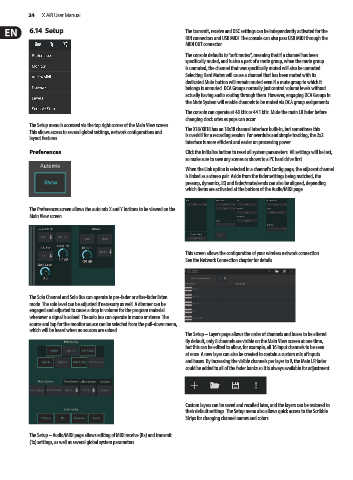
           The Setup menu is accessed via the top right corner of the Main View screen.
           This allows access to several global settings, network configurations and   The X18/XR18 has an 18x18 channel interface built-in, but sometimes this
                                                               is overkill for a recording session. For overdubs and simple tracking, the 2x2
           layout features.
                                                               interface is more efficient and easier on processing power.
           Preferences                                         Click the Initialize button to reset all system parameters. All settings will be lost,
                                                               so make sure to save any scenes or shows to a PC hard drive first.
                                                               When the Link option is selected in a channel's Config page, the adjacent channel
                                                               is linked as a stereo pair. Aside from the fader settings being matched, the
                                                               preamp, dynamics, EQ and fader/mute/sends can also be aligned, depending
                                                               which items are activated at the bottom of the Audio/MIDI page.


           The Preferences screen allows the auto mix X and Y buttons to be viewed on the
           Main View screen.


                                                               This screen allows the configuration of your wireless network connection.
                                                               See the Network Connection chapter for details.


           The Solo Channel and Solo Bus can operate in pre-fader or after-fader listen
           mode. The solo level can be adjusted if necessary as well. A dimmer can be
           engaged and adjusted to cause a drop in volume for the program material
           whenever a signal is soloed. The solo bus can operate in mono or stereo. The
           source and tap for the monitor source can be selected from the pull-down menu,
           which will be heard when no sources are soloed.
                                                               The Setup – Layers page allows the order of channels and buses to be altered.
                                                               By default, only 8 channels are visible on the Main View screen at one time,
                                                               but this can be edited to allow, for example, all 16 input channels to be seen
                                                               at once. A new layer can also be created to contain a custom mix of inputs
                                                               and buses. By increasing the visible channels per layer to 9, the Main LR fader
                                                               could be added to all of the fader banks so it is always available for adjustment.


                                                               Custom layers can be saved and recalled later, and the layers can be restored to
                                                               their default settings. The Setup menu also allows quick access to the Scribble
                                                               Strips for changing channel names and colors.


           The Setup – Audio/MIDI page allows editing of MIDI receive (Rx) and transmit
           (Tx) settings, as well as several global system parameters.

