


Page 133 - Python Data Science Handbook
P. 133
Operating on Data in Pandas


               One of the essential pieces of NumPy is the ability to perform quick element-wise
               operations, both with basic arithmetic (addition, subtraction, multiplication, etc.) and
               with more sophisticated operations (trigonometric functions, exponential and loga‐
               rithmic functions, etc.). Pandas inherits much of this functionality from NumPy, and
               the ufuncs that we introduced in “Computation on NumPy Arrays: Universal Func‐
               tions” on page 50 are key to this.
               Pandas includes a couple useful twists, however: for unary operations like negation
               and trigonometric functions, these ufuncs will preserve index and column labels in the
               output, and for binary operations such as addition and multiplication, Pandas will
               automatically align indices  when passing the objects to the ufunc. This means that
               keeping the context of data and combining data from different sources—both poten‐
               tially error-prone tasks with raw NumPy arrays—become essentially foolproof ones
               with Pandas. We will additionally see that there are well-defined operations between
               one-dimensional Series structures and two-dimensional DataFrame structures.

               Ufuncs: Index Preservation

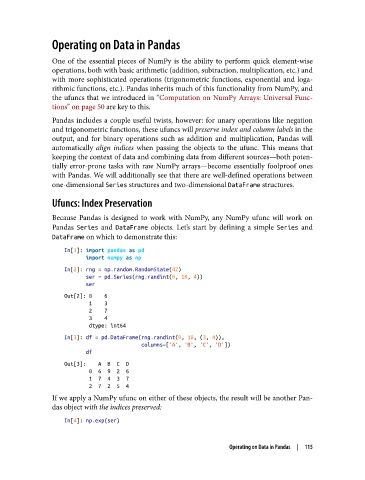
               Because Pandas is designed to work with NumPy, any NumPy ufunc will work on
               Pandas Series  and DataFrame  objects. Let’s start by defining a simple Series  and
               DataFrame on which to demonstrate this:
                   In[1]: import pandas as pd
                          import numpy as np
                   In[2]: rng = np.random.RandomState(42)
                          ser = pd.Series(rng.randint(0, 10, 4))
                          ser
                   Out[2]: 0    6
                           1    3
                           2    7
                           3    4
                           dtype: int64
                   In[3]: df = pd.DataFrame(rng.randint(0, 10, (3, 4)),
                                            columns=['A', 'B', 'C', 'D'])
                          df
                   Out[3]:    A  B  C  D
                           0  6  9  2  6
                           1  7  4  3  7
                           2  7  2  5  4
               If we apply a NumPy ufunc on either of these objects, the result will be another Pan‐
               das object with the indices preserved:

                   In[4]: np.exp(ser)


                                                                Operating on Data in Pandas  |  115

