


Page 192 - Python Data Science Handbook
P. 192
Example: Birthrate Data

               As a more interesting example, let’s take a look at the freely available data on births in
               the United States, provided by the Centers for Disease Control (CDC). This data can
               be   found  at   https://raw.githubusercontent.com/jakevdp/data-CDCbirths/master/
               births.csv (this dataset has been analyzed rather extensively by Andrew Gelman and
               his group; see, for example, this blog post):
                   In[10]:
                   # shell command to download the data:
                   # !curl -O https://raw.githubusercontent.com/jakevdp/data-CDCbirths/
                   # master/births.csv
                   In[11]: births = pd.read_csv('births.csv')
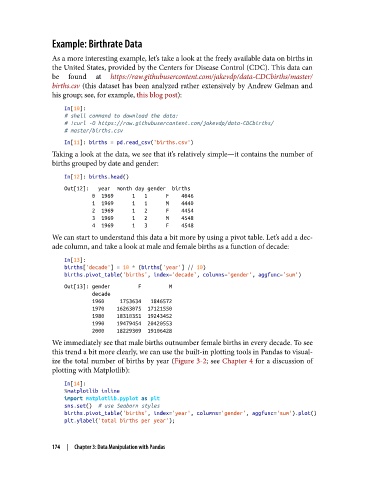
               Taking a look at the data, we see that it’s relatively simple—it contains the number of
               births grouped by date and gender:

                   In[12]: births.head()
                   Out[12]:   year  month day gender  births
                            0  1969      1   1      F    4046
                            1  1969      1   1      M    4440
                            2  1969      1   2      F    4454
                            3  1969      1   2      M    4548
                            4  1969      1   3      F    4548
               We can start to understand this data a bit more by using a pivot table. Let’s add a dec‐
               ade column, and take a look at male and female births as a function of decade:
                   In[13]:
                   births['decade'] = 10 * (births['year'] // 10)
                   births.pivot_table('births', index='decade', columns='gender', aggfunc='sum')
                   Out[13]: gender         F         M
                            decade
                            1960     1753634   1846572
                            1970    16263075  17121550
                            1980    18310351  19243452
                            1990    19479454  20420553
                            2000    18229309  19106428
               We immediately see that male births outnumber female births in every decade. To see
               this trend a bit more clearly, we can use the built-in plotting tools in Pandas to visual‐
               ize the total number of births by year (Figure 3-2; see Chapter 4 for a discussion of
               plotting with Matplotlib):

                   In[14]:
                   %matplotlib inline
                   import matplotlib.pyplot as plt
                   sns.set()  # use Seaborn styles
                   births.pivot_table('births', index='year', columns='gender', aggfunc='sum').plot()
                   plt.ylabel('total births per year');


               174  |  Chapter 3: Data Manipulation with Pandas

