


Page 195 - Python Data Science Handbook
P. 195
Another interesting view is to plot the mean number of births by the day of the year.
               Let’s first group the data by month and day separately:

                   In[20]:
                   births_by_date = births.pivot_table('births',
                                                       [births.index.month, births.index.day])
                   births_by_date.head()
                   Out[20]: 1  1    4009.225
                               2    4247.400
                               3    4500.900
                               4    4571.350
                               5    4603.625
                            Name: births, dtype: float64
               The result is a multi-index over months and days. To make this easily plottable, let’s
               turn these months and days into a date by associating them with a dummy year vari‐
               able (making sure to choose a leap year so February 29th is correctly handled!)
                   In[21]: births_by_date.index = [pd.datetime(2012, month, day)
                                                   for (month, day) in births_by_date.index]
                           births_by_date.head()
                   Out[21]: 2012-01-01    4009.225
                            2012-01-02    4247.400
                            2012-01-03    4500.900
                            2012-01-04    4571.350
                            2012-01-05    4603.625
                            Name: births, dtype: float64
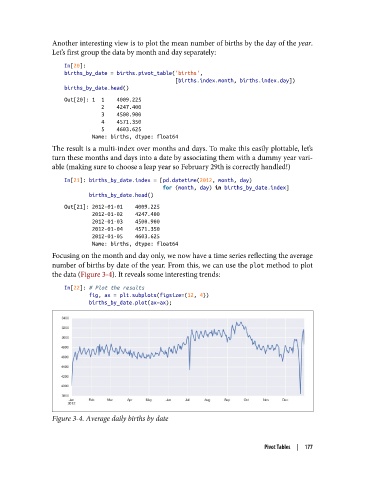
               Focusing on the month and day only, we now have a time series reflecting the average
               number of births by date of the year. From this, we can use the plot method to plot
               the data (Figure 3-4). It reveals some interesting trends:

                   In[22]: # Plot the results
                           fig, ax = plt.subplots(figsize=(12, 4))
                           births_by_date.plot(ax=ax);


               Figure 3-4. Average daily births by date


                                                                          Pivot Tables  |  177

