


Page 217 - Python Data Science Handbook
P. 217
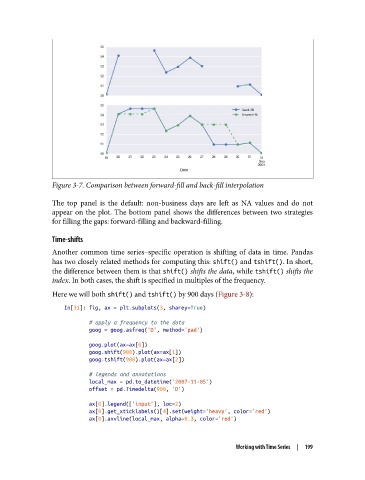
Figure 3-7. Comparison between forward-fill and back-fill interpolation

               The top panel is the default: non-business days are left as NA values and do not
               appear on the plot. The bottom panel shows the differences between two strategies
               for filling the gaps: forward-filling and backward-filling.

               Time-shifts
               Another common time series–specific operation is shifting of data in time. Pandas
               has two closely related methods for computing this: shift() and tshift(). In short,
               the difference between them is that shift() shifts the data, while tshift() shifts the
               index. In both cases, the shift is specified in multiples of the frequency.

               Here we will both shift() and tshift() by 900 days (Figure 3-8):
                   In[31]: fig, ax = plt.subplots(3, sharey=True)

                           # apply a frequency to the data
                           goog = goog.asfreq('D', method='pad')

                           goog.plot(ax=ax[0])
                           goog.shift(900).plot(ax=ax[1])
                           goog.tshift(900).plot(ax=ax[2])

                           # legends and annotations
                           local_max = pd.to_datetime('2007-11-05')
                           offset = pd.Timedelta(900, 'D')

                           ax[0].legend(['input'], loc=2)
                           ax[0].get_xticklabels()[4].set(weight='heavy', color='red')
                           ax[0].axvline(local_max, alpha=0.3, color='red')


                                                                  Working with Time Series  |  199

