


Page 525 - Python Data Science Handbook
P. 525
4. Normalize the histograms in each cell by comparing to the block of neighboring
                   cells. This further suppresses the effect of illumination across the image.
                5. Construct a one-dimensional feature vector from the information in each cell.

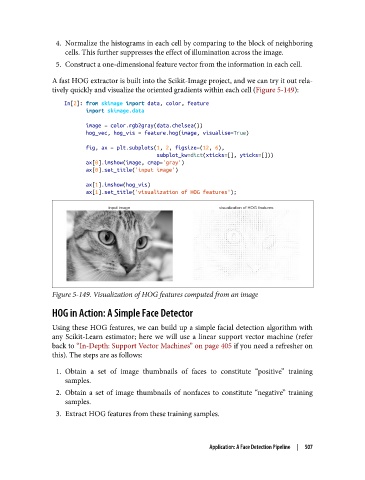
               A fast HOG extractor is built into the Scikit-Image project, and we can try it out rela‐
               tively quickly and visualize the oriented gradients within each cell (Figure 5-149):
                   In[2]: from skimage import data, color, feature
                          import skimage.data

                          image = color.rgb2gray(data.chelsea())
                          hog_vec, hog_vis = feature.hog(image, visualise=True)

                          fig, ax = plt.subplots(1, 2, figsize=(12, 6),
                                                 subplot_kw=dict(xticks=[], yticks=[]))
                          ax[0].imshow(image, cmap='gray')
                          ax[0].set_title('input image')
                          ax[1].imshow(hog_vis)
                          ax[1].set_title('visualization of HOG features');


               Figure 5-149. Visualization of HOG features computed from an image

               HOG in Action: A Simple Face Detector

               Using these HOG features, we can build up a simple facial detection algorithm with
               any Scikit-Learn estimator; here we will use a linear support vector machine (refer
               back to “In-Depth: Support Vector Machines” on page 405 if you need a refresher on
               this). The steps are as follows:

                1. Obtain a set of image thumbnails of faces to constitute “positive” training
                   samples.
                2. Obtain a set of image thumbnails of nonfaces to constitute “negative” training
                   samples.
                3. Extract HOG features from these training samples.


                                                           Application: A Face Detection Pipeline  |  507

