


Page 69 - 18-868 SEO PowerSuite Workflow_VPMGC
P. 69
SEO Workflow


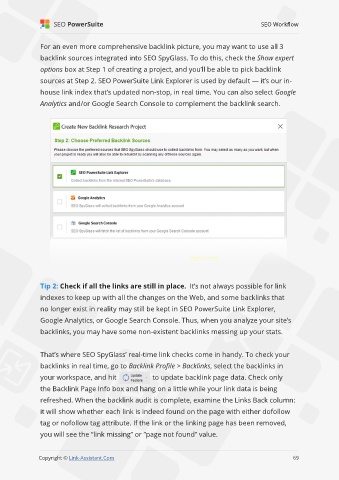
               For an even more comprehensive backlink picture, you may want to use all 3

               backlink sources integrated into SEO SpyGlass. To do this, check the Show expert
               options box at Step 1 of creating a project, and you’ll be able to pick backlink

               sources at Step 2. SEO PowerSuite Link Explorer is used by default — it’s our in-
               house link index that’s updated non-stop, in real time. You can also select Google

               Analytics and/or Google Search Console to complement the backlink search.


               Tip 2: Check if all the links are still in place.  It’s not always possible for link
               indexes to keep up with all the changes on the Web, and some backlinks that

               no longer exist in reality may still be kept in SEO PowerSuite Link Explorer,
               Google Analytics, or Google Search Console. Thus, when you analyze your site’s

               backlinks, you may have some non-existent backlinks messing up your stats.


               That’s where SEO SpyGlass’ real-time link checks come in handy. To check your
               backlinks in real time, go to Backlink Profile > Backlinks, select the backlinks in

               your workspace, and hit                 to update backlink page data. Check only
               the Backlink Page Info box and hang on a little while your link data is being

               refreshed. When the backlink audit is complete, examine the Links Back column:
               it will show whether each link is indeed found on the page with either dofollow

               tag or nofollow tag attribute. If the link or the linking page has been removed,
               you will see the “link missing” or “page not found” value.

                                                                                                             69

               Copyright © Link-Assistant.Com                                                           69

