


Page 65 - 18-868 SEO PowerSuite Workflow_VPMGC
P. 65
SEO Workflow


                   Step 5: Use the right alt texts for images


               Search engines can’t analyze images or read text off them — so your images’
               alternative attributes are a way of telling search engine bots what the image is

               about.


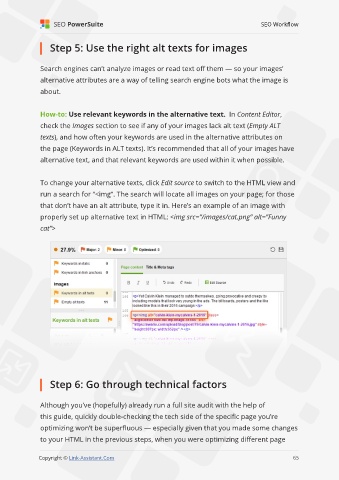
               How-to: Use relevant keywords in the alternative text.  In Content Editor,
               check the Images section to see if any of your images lack alt text (Empty ALT

               texts), and how often your keywords are used in the alternative attributes on

               the page (Keywords in ALT texts). It’s recommended that all of your images have
               alternative text, and that relevant keywords are used within it when possible.


               To change your alternative texts, click Edit source to switch to the HTML view and

               run a search for “<img”. The search will locate all images on your page; for those
               that don’t have an alt attribute, type it in. Here’s an example of an image with
               properly set up alternative text in HTML: <img src=”/images/cat.png” alt=”Funny

               cat”>


                   Step 6: Go through technical factors


               Although you’ve (hopefully) already run a full site audit with the help of
               this guide, quickly double-checking the tech side of the specific page you’re

               optimizing won’t be superfluous — especially given that you made some changes
               to your HTML in the previous steps, when you were optimizing different page
                                                                                                             65

               Copyright © Link-Assistant.Com                                                           65

