


Page 131 - Installation Manual - GenII DTS
P. 131
Accessories
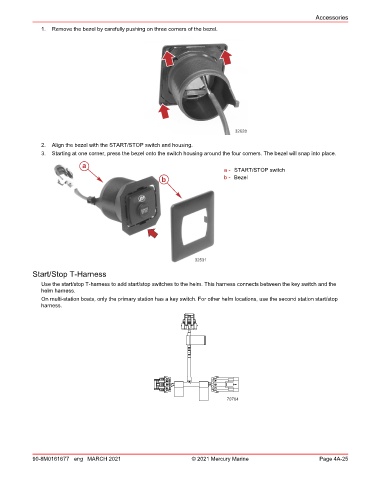
               1.  Remove the bezel by carefully pushing on three corners of the bezel.


                                                                               32628

               2.  Align the bezel with the START/STOP switch and housing.
               3.  Starting at one corner, press the bezel onto the switch housing around the four corners. The bezel will snap into place.
                            a
                                                                           a - START/STOP switch
                                                      b                    b - Bezel


                                                                 32531
            Start/Stop T‑Harness

               Use the start/stop T‑harness to add start/stop switches to the helm. This harness connects between the key switch and the
               helm harness.
               On multi‑station boats, only the primary station has a key switch. For other helm locations, use the second station start/stop
               harness.


                                                                            70764


            90-8M0161677 eng MARCH 2021                         © 2021 Mercury Marine                      Page 4A-25

