


Page 129 - Installation Manual - GenII DTS
P. 129
Accessories
               2.  Verify the underside of the console is clear of wiring and obstruction.
               3.  If the console is constructed of fiberglass, apply masking tape to the area to prevent chipping and cracking.
               4.  Drill a 53.97 mm (2.125 in.) hole.
               5.  Ensure the opening is free of sharp edges.
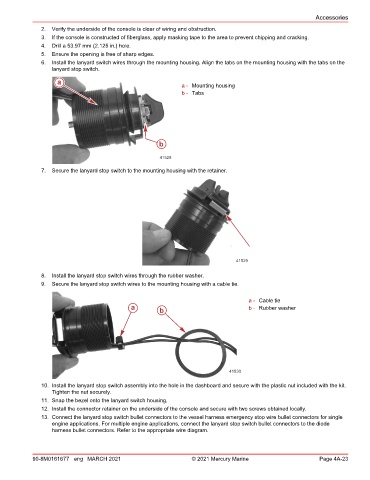
               6.  Install the lanyard switch wires through the mounting housing. Align the tabs on the mounting housing with the tabs on the
                  lanyard stop switch.

                    a
                                                             a - Mounting housing
                                                             b - Tabs


                                                      b

                                                      41528
               7.  Secure the lanyard stop switch to the mounting housing with the retainer.


                                                                               41529

               8.  Install the lanyard stop switch wires through the rubber washer.
               9.  Secure the lanyard stop switch wires to the mounting housing with a cable tie.

                                                                                   a - Cable tie
                                            a         b                            b - Rubber washer


                                                                             41530

               10. Install the lanyard stop switch assembly into the hole in the dashboard and secure with the plastic nut included with the kit.
                  Tighten the nut securely.
               11. Snap the bezel onto the lanyard switch housing.
               12. Install the connector retainer on the underside of the console and secure with two screws obtained locally.
               13. Connect the lanyard stop switch bullet connectors to the vessel harness emergency stop wire bullet connectors for single
                  engine applications. For multiple engine applications, connect the lanyard stop switch bullet connectors to the diode
                  harness bullet connectors. Refer to the appropriate wire diagram.


            90-8M0161677 eng MARCH 2021                         © 2021 Mercury Marine                      Page 4A-23

